Hero Forge
A downloadable tool
Hero Forge: a character creator that fights back
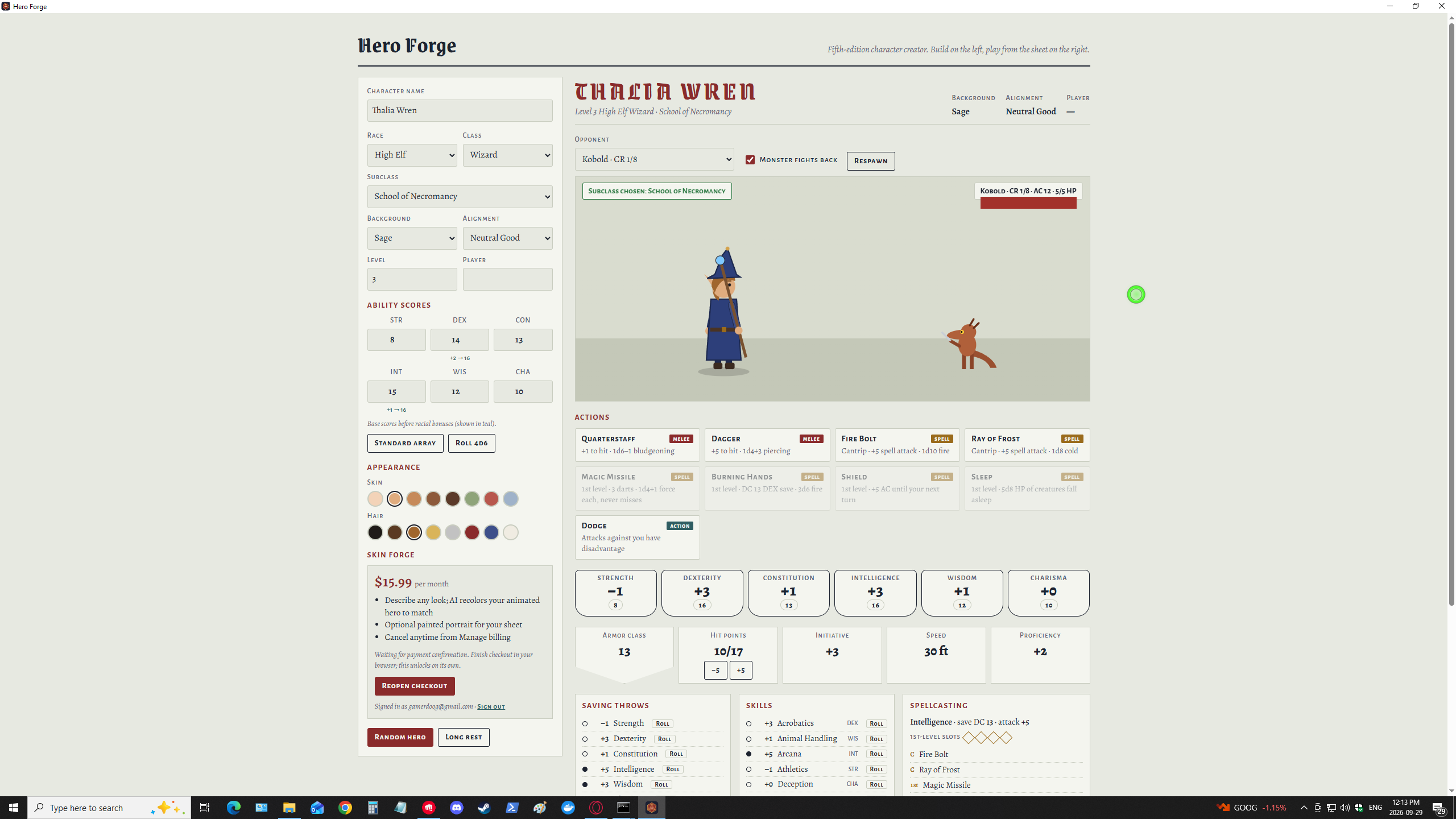
Most character builders stop at a sheet of numbers. Hero Forge gives you the sheet and then puts your hero on a stage. Pick a race and class, and a little animated version of your character steps up to face a goblin, an owlbear or a young red dragon. Every button on the sheet rolls real dice and plays out on screen, from sneak attacks to smites and wild shapes.
Build your hero
- 41 races, grouped by sourcebook: the classics plus dragonborn, tieflings, goliaths, tabaxi, warforged, genasi and more. Each one looks different on stage.
- 14 classes: all twelve core classes plus the Artificer and the Blood Hunter.
- 47 subclasses, unlocked at level 3. Each class has three or four archetypes, from Champion and Battle Master to Circle of the Moon and Order of the Lycan.
- Levels 1 to 20, with hit points, proficiency, spell slots and features that scale as you level.
- Standard array, a 4d6 roll, or type your own scores. Racial bonuses are applied for you.
- 8 backgrounds, alignment, and skin and hair colors.
- Random hero rolls up a complete character in one click when you need an NPC fast.
A sheet you can play
- Ability scores, saving throws, skills (with expertise), AC, initiative, speed and passive Perception, all worked out for you.
- Click any ability, save or skill to roll it.
- Features and traits for your race, class and subclass, listed as you unlock them.
- Spellcasting with your save DC, attack bonus and spell slots that empty as you cast.
- A roll log that shows every die, so you can see why a hit landed.
Fight on the sheet
- Choose from 15 opponents, from a training dummy and kobolds up to a troll and a young red dragon, each with their own AC, hit points, resistances and attacks.
- Your actions come from your build: weapon attacks, 24 spells, Rage, Flurry of Blows, Lay on Hands, Crimson Rite and more.
- Subclass features really work. Critical hits land on a 19 for a Champion, Divine Strike adds radiant damage, Portent lets you set a die roll, Wrath of the Storm lightning strikes back at attackers, and Wild Shape turns you into a bear.
- Turn on Monster fights back and the monster takes its turn after yours. Use Dodge, Shield and your class reactions to survive.
- Take a long rest to restore hit points, spell slots and features.
Skin Forge (optional subscription)
Describe the hero you picture, like "frost-touched tiefling in obsidian plate" or "storm-touched sea elf in barnacled bronze", and the Skin Forge restyles your animated hero to match: skin, hair, armor, trim, eyes, a cape and a magical glow. Tick one box and it also paints a portrait for the top of your sheet.
- $15.99 per month, billed through Stripe. Cancel anytime from Manage billing inside the app.
- Up to 150 looks and 40 portraits a month.
- Sign in with your email. You get a 6-digit code; there's no password to remember.
- Your saved looks sit in a list so you can switch outfits in one click.
Everything else in Hero Forge is free to use without an account. The Skin Forge needs an internet connection; the rest of the app works offline.
How it works
- Download and run
HeroForge.exe. There's nothing to install. - Name your hero and pick a race, class, level and background.
- Choose Standard array or Roll 4d6 for your ability scores.
- At level 3, choose a subclass.
- Pick an opponent and click an action to fight.
Your character is saved automatically and is waiting when you reopen the app.
Requirements
- Windows 10 or 11, 64-bit.
- An internet connection for the Skin Forge only.
FAQ
Is this an official D&D product?
No. Hero Forge is an unofficial fan-made tool and isn't affiliated with or endorsed by Wizards of the Coast or Critical Role.
Does it replace my rulebooks?
No. Hero Forge handles the numbers and gives you a fun way to try a build, but it's simplified in places. Keep your books handy for the full rules text.
Do I need the Skin Forge?
No. Every race, class, subclass, monster and combat feature is free. The Skin Forge only adds AI-made looks and portraits.
What happens to my looks if I cancel?
The looks and portrait you've already made stay in the app. You just can't make new ones until you subscribe again.
Will Windows show a warning when I run it?
It may. If Windows SmartScreen says "Windows protected your PC", click More info → Run anyway.
Download
Click download now to get access to the following files:
Leave a comment
Log in with itch.io to leave a comment.