Sprite Forge Frame Fixer
A downloadable tool
SpriteForge Frame Fixer
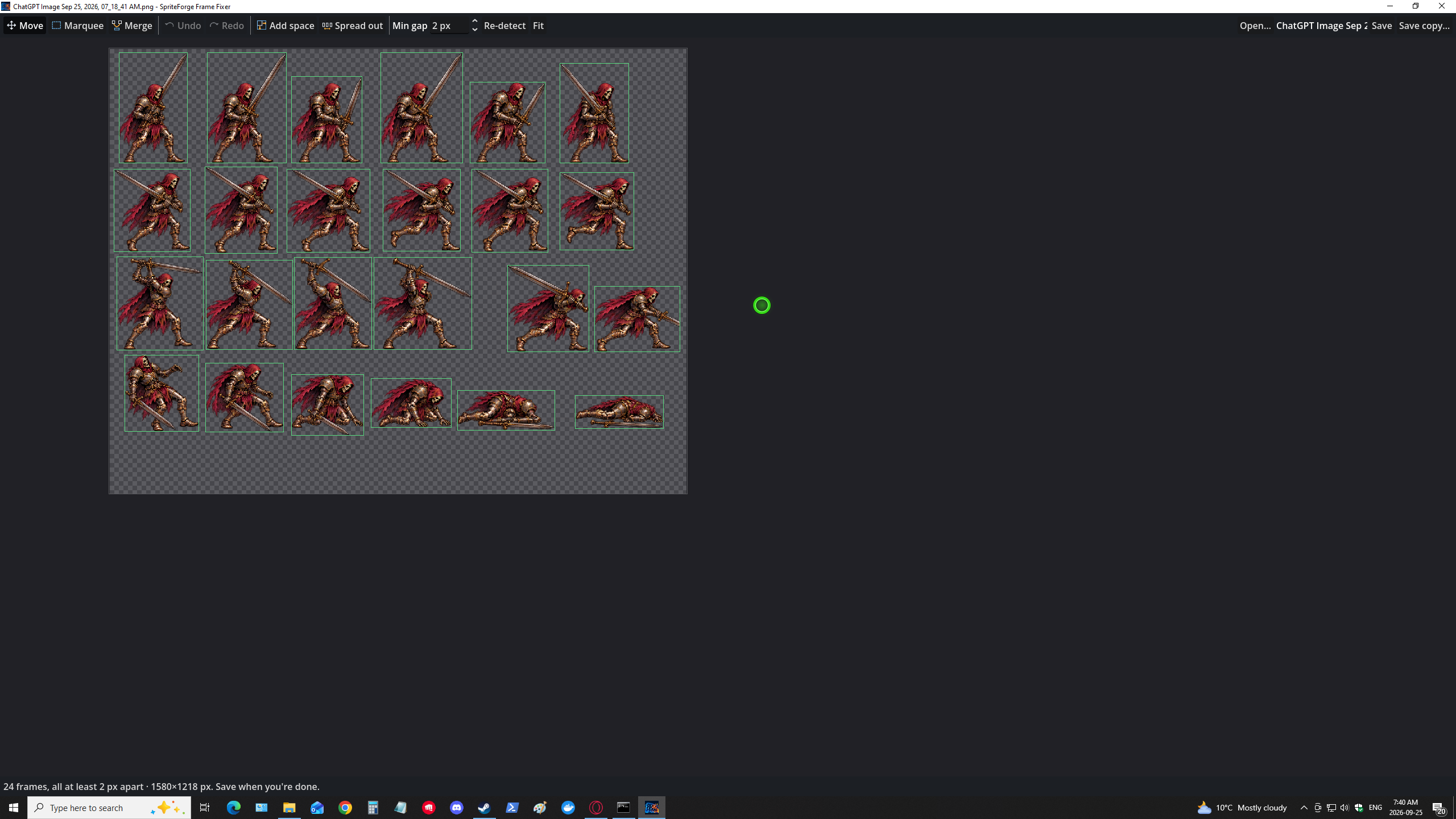
Sprite sheets where the frames are crammed together break every slicing tool: tails poke into the next frame, glows touch, and two sprites get cut as one. Frame Fixer lets you fix the sheet itself. Right-click the image, see a box around every frame, and drag the sprites apart.
What it does
Opens from Explorer's right-click menu
- Right-click any PNG, JPG, WebP, BMP or TGA → Edit frames in SpriteForge.
- Every frame is detected and boxed automatically.
- Frames that are too close to a neighbour are marked red, so you know exactly what to fix. Set the minimum gap yourself.
Move sprites apart
- Move tool: drag a frame and its sprite comes with it. The space it leaves is cleared cleanly, even on sheets with a solid background.
- Select a group: Ctrl+click or Shift+click frames, then drag, nudge, merge or delete them together.
- Marquee tool: select any area and drag it, when you need more than one frame's box.
- Arrow keys nudge by 1 px, or 10 px with Shift.
Make room
- Spread out: pushes every frame apart in one click, keeps rows and frame order, and grows the image to fit.
- Add space: adds empty room on any side of the image.
- Drag a sprite past the edge and the image grows instead of cutting it off.
Fix the frame boxes
- Merge two boxes that should be one frame.
- Resize a box by dragging its edges, draw a new one, or delete it.
Safe to experiment
- Undo and redo everything, up to 30 steps (Ctrl+Z / Ctrl+Y).
- Save keeps a backup of your original the first time (
name.original.png). Save copy writes a new file instead. - It asks before closing with unsaved changes.
How it works
- Right-click a sprite sheet in Explorer → Edit frames in SpriteForge.
- Look for red boxes: those frames are too close.
- Drag them apart, or click Spread out.
- Press Ctrl+S. Your sheet is ready for any slicer, including SpriteForge Studio and Animation Importer Pro.
Keyboard shortcuts
- V Move tool · M Marquee tool · G Merge
- Ctrl+Z Undo · Ctrl+Y Redo · Ctrl+S Save · Ctrl+O Open · Ctrl+A Select all
- Arrow keys Nudge (Shift = 10 px) · Delete Remove · F Fit to window
- Mouse wheel Zoom · Right-drag Pan
What you get
SpriteForge-Frame-Fixer-Setup-1.0.0.exe: installs for your Windows account (no administrator rights needed), adds the right-click menu and a Start menu shortcut, and appears in Settings → Apps for a clean uninstall.
Requirements
- Windows 10 or 11, 64-bit.
- Works with PNG, JPG, WebP, BMP and TGA sprite sheets, transparent or with a solid background.
- No Godot needed. It's a standalone app.
FAQ
Where is the right-click entry on Windows 11?
Under Show more options in the right-click menu, or Shift+right-click the file.
Will it damage my sheet?
No. The first save keeps your original as name.original.png, and everything can be undone.
Two sprites were detected as one box. What now?
Use the Marquee tool to select one of them and drag it away, then Re-detect. Or draw a new box around it.
Do I need SpriteForge Studio?
No, Frame Fixer works on its own with any engine. It pairs well with SpriteForge Studio and Animation Importer Pro for Godot: fix the spacing here, then import in one click.
Will the installer trigger a Windows warning?
The installer isn't code-signed yet, so Windows may show an "unknown publisher" prompt. Click More info → Run anyway.
Purchase
In order to download this tool you must purchase it at or above the minimum price of $2.99 USD. You will get access to the following files:
Leave a comment
Log in with itch.io to leave a comment.