Sprite Forge - Sheet Generator
A downloadable tool
SpriteForge Sheet Generator
Type "a hooded skeleton archer with a longbow", tick Idle, Walk, Shoot, Hurt and Death, and click Generate. Sheet Generator has OpenAI's latest image models draw your character and every animation, then turns the results into a clean sprite sheet you can drop straight into your game: frames cut out, backgrounds removed, the character the same size in every animation, and the feet on one ground line.
What it does
Draws your character first
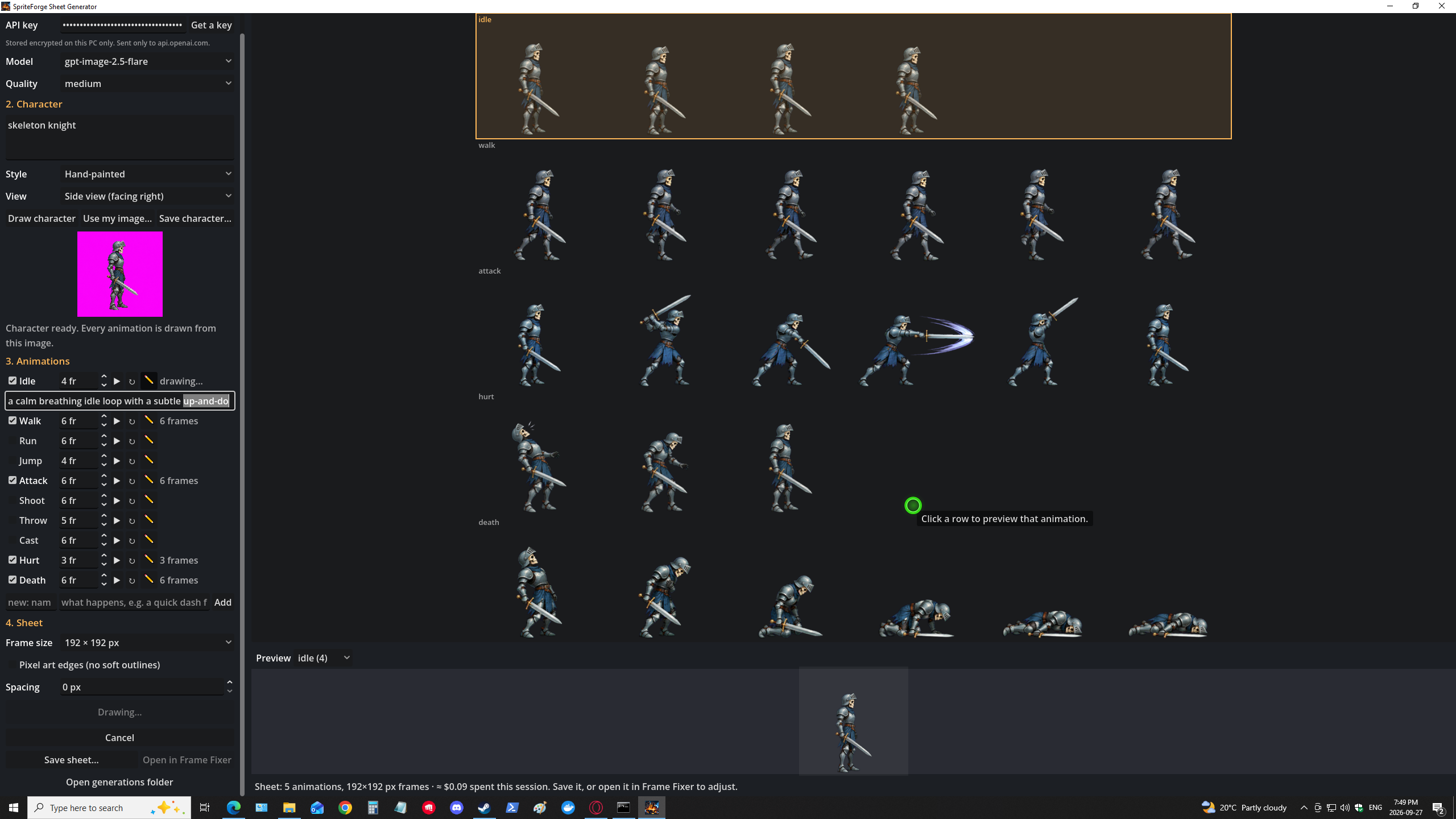
- Describe the character and pick a style: pixel art, hand-painted, cartoon, anime, dark fantasy or chibi.
- Pick a view: side (facing right or left), front, three-quarter or top-down.
- Draw character makes one reference image. Redraw until you like it, then every animation is drawn from that same character, so the design stays consistent.
- Already have character art? Use my image and animate your own design.
- Save character saves the character by itself as a transparent PNG.
Draws every animation you need
- Idle, Walk, Run, Jump, Attack, Shoot, Throw, Cast, Hurt and Death, each with its own frame count.
- Archers, gunners and rangers get the Shoot animation automatically: draw an arrow, aim, release, with the arrow flying off.
- Rewrite any animation with ✎: "fires a crossbow bolt", "swings a hammer overhead", "a quick dash forward".
- Add your own animations with a name and a line of description.
- Not happy with one? ↻ redraws just that animation.
Prompts tuned for every animation
- Each animation uses the prompt style that won in live tests. Actions like attack, shoot, cast and throw list the pose of every frame (wind-up, strike, release, recover), so you get the whole motion, not three frames of standing still.
- Walks actually stride, death falls and settles instead of repeating the same pose, and the character stays the same size in every frame.
Builds a clean, game-ready sheet
- Backgrounds are removed cleanly, with no magenta fringe around the edges.
- Frames are cut out automatically, each from its own pixels. A swung staff, a sword slash or a fireball stays with the frame it belongs to, and nothing from the next frame spills in.
- Characters are never sliced in half, and lying-down poses count as frames too.
- The character is the same size in every animation, with the feet on the same ground line, so switching from idle to attack doesn't jump.
- Frame sizes from 64 to 256 px, crisp pixel-art edges, and optional spacing between frames.
- Long animations (7 to 12 frames) are drawn in two rows so every frame has room.
Preview before you save
- Click any animation, or any row on the sheet, to watch it play.
Save and use anywhere
- Save sheet writes a PNG plus a JSON file listing the frame size, rows, frame counts, speeds and looping.
- The rows come in the order Animation Importer Pro for Godot expects, so it names every animation for you.
- Open in Frame Fixer opens the sheet for spacing tweaks, if you have SpriteForge Frame Fixer installed.
How it works
- Paste your OpenAI API key (once).
- Describe your character, choose a style and view, and click Draw character.
- Tick the animations you want and click Generate sprite sheet.
- Click the animations to preview them, redraw any you don't like, then Save sheet.
Costs and your API key
Sheet Generator uses your own OpenAI API key, so images are billed by OpenAI to your account at OpenAI's prices. There's no subscription and no middleman. The app shows a running cost estimate while you work.
In our tests at low quality, each animation cost about $0.012, so a full five-animation sheet costs well under a dollar. Higher qualities cost more.
- Your key is stored encrypted on your PC and sent only to OpenAI.
- Every image OpenAI returns is kept in the app's generations folder, so nothing you paid for is lost.
- Start with quality low to try ideas cheaply, then switch to medium or high for your final sheet.
Supports gpt-image-2.5-flare (fast, default), gpt-image-2.5-sunburst, gpt-image-2, or any image model ID you type in.
What you get
SpriteForge-Sheet-Generator-Setup-1.0.0.exe: installs for your Windows account (no administrator rights needed) with Start menu and desktop shortcuts, and uninstalls cleanly from Settings → Apps.
Requirements
- Windows 10 or 11, 64-bit.
- An OpenAI API key with access to image generation. Get one at platform.openai.com.
- An internet connection.
FAQ
Is the art mine to use in my game?
Images you generate with your own OpenAI key are covered by OpenAI's terms. Check them for your use case.
Does it always draw exactly the number of frames I ask for?
Usually. In our tests every animation came back with exactly the frames asked for. When a model draws fewer (or more), Sheet Generator uses the frames that were actually drawn, tells you, and never pads the sheet with cut-up or blank frames. Press ↻ to try again.
Can I fix spacing or frames afterwards?
Yes. Open the sheet in SpriteForge Frame Fixer to drag frames apart, merge or redraw boxes, then import it into Godot with Animation Importer Pro or SpriteForge Studio.
Does it work without Godot?
Yes. The sheet is a plain PNG with a JSON description, usable in any engine.
Will the installer trigger a Windows warning?
The installer isn't code-signed yet, so Windows may show an "unknown publisher" prompt. Click More info → Run anyway.
Purchase
In order to download this tool you must purchase it at or above the minimum price of $14.99 USD. You will get access to the following files:
Comments
Log in with itch.io to leave a comment.
Is this example image the best this product can do? There are alarming issues with the sprite sheet generated.. did you not notice these things or is it just not possible to fix?
His idle animation has a question mark and he's looking around for some reason.
Halfway through his walking animation his leg just snaps in half - but worse, his walk animation is left foot forward - pause - left foot forward - pause, there's no walk mechanic there.
His casting animation climax has him using both hands out, as his staff just holds itself up - and his spell cast is cut off by the edge of the frame.
During his death animation his staff head pops off, then re-attaches as he hits the floor. Then we have a big green orb just floating above his body in the next frame?
it's all prompts you type into the software to have it output what you wanted. That's what I got from my prompt so I could show an example. So to answer your question, yes it can be fixed in the prompts. My other addon programs I sell can also be used to fix up, adjust and edit the images. You might like to check those out. My favorite is Frame Fixer, you just right click your image in Windows Explorer and then can edit the frames.
I generated another image so you can see. It's all dependent on what prompt you put it. This new one is the standard prompt without changing anything. comes installed this way.